PyAMS
BETA
Model and simulate analog and mixed-signal circuits in Python. Describe an element in a few lines, connect it to ready-made components, and run a DC, transient or AC analysis.
Free and open source (MIT) · Python 3.8+ · Linux, Windows, macOS
Install Documentation
PyAMS (Python for Analog and Mixed Signals) is an open-source tool
for modeling and simulating analog and mixed-signal electronic circuits. It is built around the
pyams-lib library, which solves circuits by modified nodal analysis
and Newton–Raphson, so you only describe what each element does.
Connect ready-made or custom elements by node names, run a DC, transient or AC analysis, sweep any parameter, and plot or post-process the results — all in plain Python.
Install pyams-lib with pip and write your circuits as Python scripts.
Use the PyAMS application or the VS Code extension for schematics, symbols and a waveform viewer. The library is already included.
Operating point, DC sweeps, time-domain simulation and small-signal frequency response.
Write a new element as a Python class: declare signals and parameters, then write the equations.
Passive elements, sources, diodes, thyristors, BJT, MOSFET, JFET, IGBT, op-amp, comparator and 555 timer.
Repeat any analysis for a list of parameter values and overlay the curves.
Adaptive time step, second-order integration and automatic convergence aids for switching circuits.
Built-in Matplotlib plots, or NumPy arrays for your own post-processing. Interactive Plotly viewer in the CAD system.
Pure Python 3 on Linux, Windows and macOS (CPython and PyPy). Only NumPy and Matplotlib are needed.
A page for every model and 40 ready-to-run circuit examples with their results.
Distributed under the MIT license.
Besides the Python library, PyAMS is a CAD system for designing and simulating circuits graphically. Use it in one of two ways:
The CAD tools inside Visual Studio Code, next to your Python files and models: draw schematics, design symbols and simulate without leaving the editor.
PyAMS extensionA dedicated application: a complete environment to draw the schematic, design symbols, run the simulation and view the results.
Download from SourceForgepyams library.
The pyams library is already included in both: you only need Python with
numpy and matplotlib.
A half-wave rectifier in a dozen lines: elements, parameters, circuit, analysis, plot.
from pyams.lib import circuit from pyams.models import Resistor, SinVoltage, Diode V1 = SinVoltage("In", "0"); V1.setParams("Va=10V Fr=2Hz") D1 = Diode("In", "Out") R1 = Resistor("Out", "0"); R1.setParams("R=1KΩ") cir = circuit() cir.addElements({"V1": V1, "D1": D1, "R1": R1}) cir.setOutPuts("In", "Out") cir.analysis(mode="tran", start=0, stop=2, step=0.001) cir.run() cir.plot()
from math import exp from pyams.lib import model, signal, param, voltage, current class MyDiode(model): def __init__(self, p, n): self.V = signal('in', voltage, p, n) self.I = signal('out', current, p, n) self.Is = param(1e-14, 'A', 'Saturation current') self.Vt = param(0.02585, 'V', 'Thermal voltage') def analog(self): self.I += self.Is * (exp(self.V / self.Vt) - 1)
Choose the analysis with analysis(mode="dc"),
analysis(mode="tran", ...) or
analysis(mode="ac", ...), and sweep any parameter with
sweep(param="R1.R", list=[...]).
Resistor, Capacitor, Inductor, Conductor, VCVS, VCCS, CCVS, CCCS, Transformer, Transmission line, with initial-condition variants.
DC, sine, AC, exponential, piece-wise linear and trapezoid (pulse) sources, for both voltage and current.
Diode, Zener, Tunnel diode, Diac, Thyristor, UJT, BJT, MOSFET, JFET, IGBT.
Operational amplifier, Comparator and 555 timer.
Every example is a complete script that builds a circuit, runs an analysis and saves the figure.
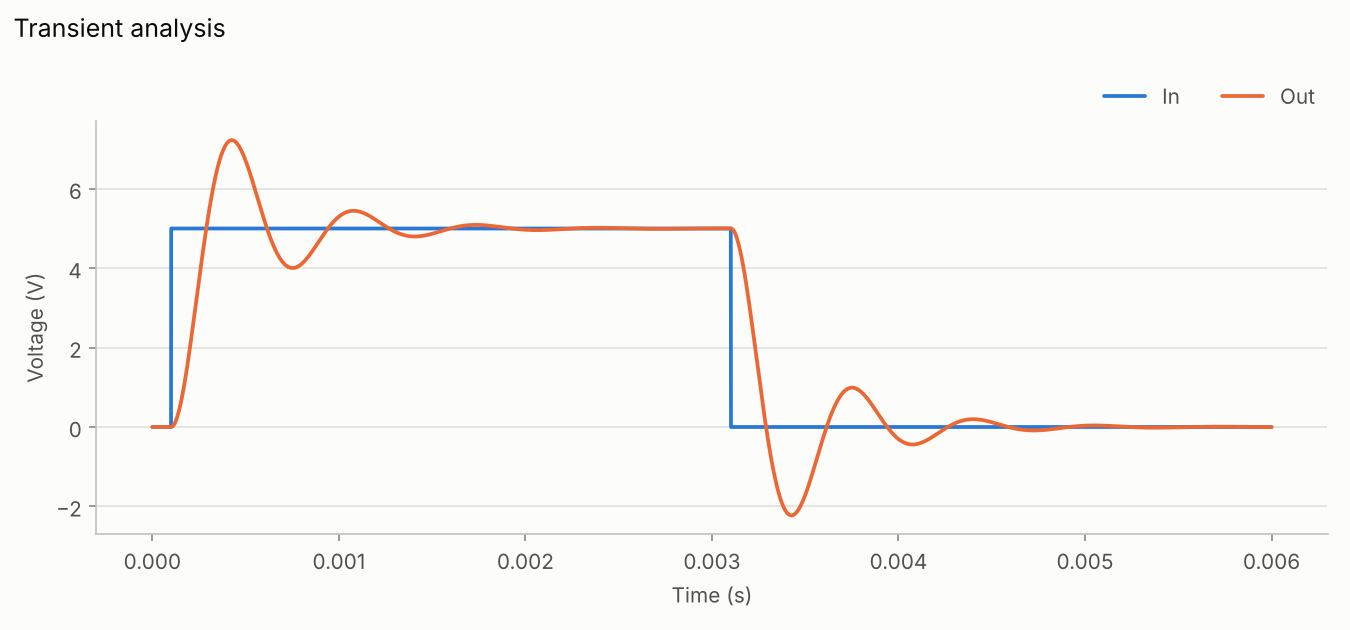
Transient ringing of an under-damped circuit.
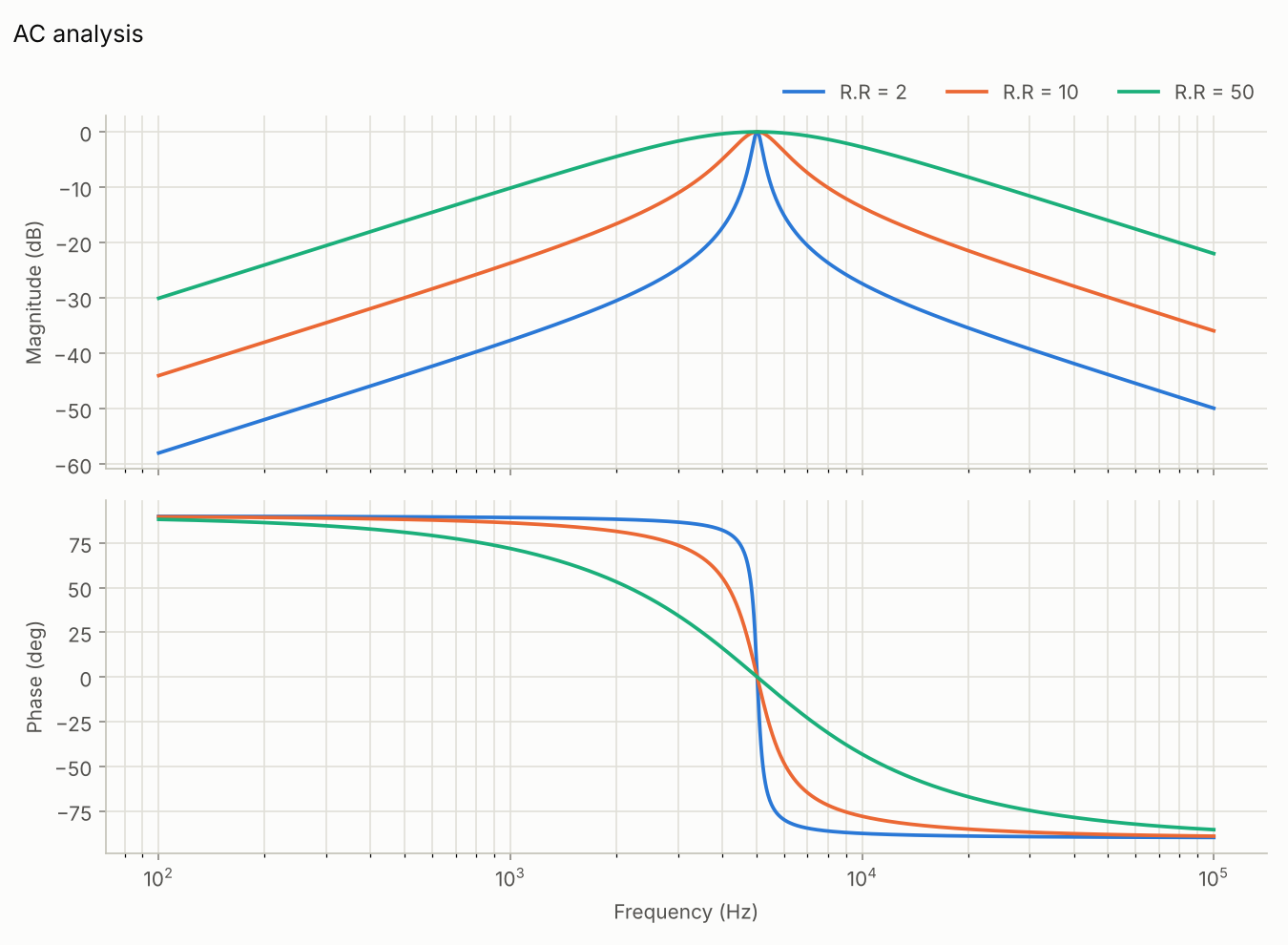
Band-pass response for several resistor values.
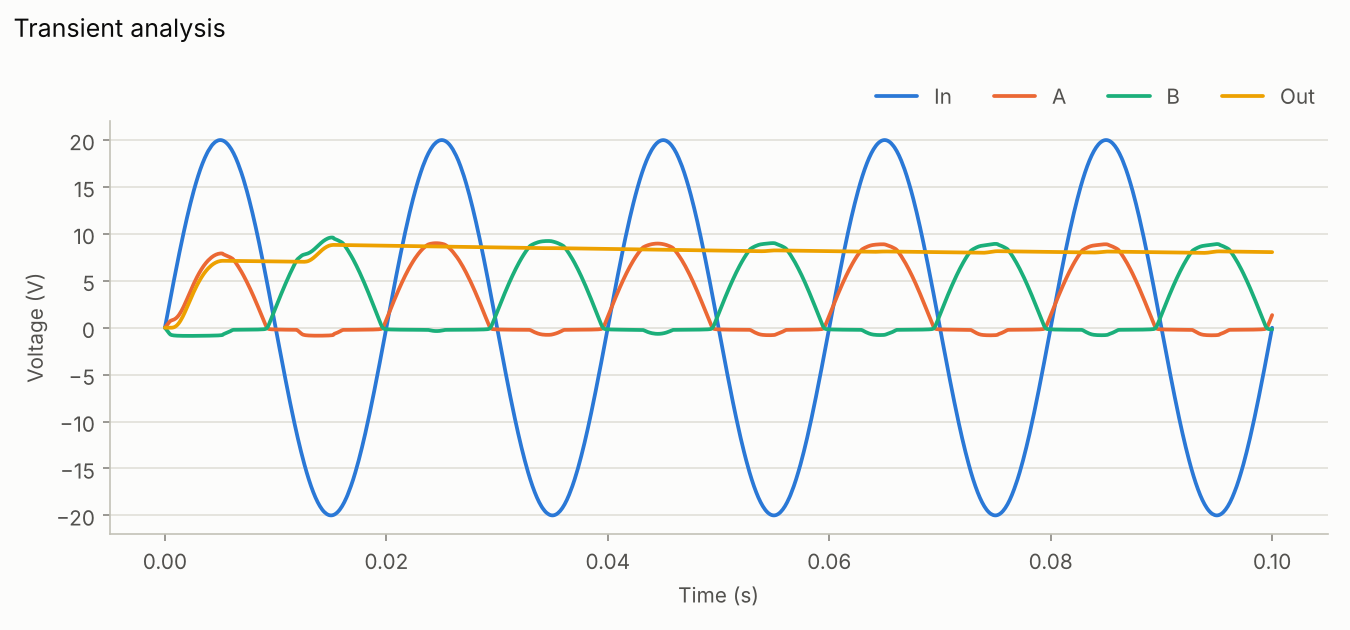
Full-wave rectification fed by a transformer.
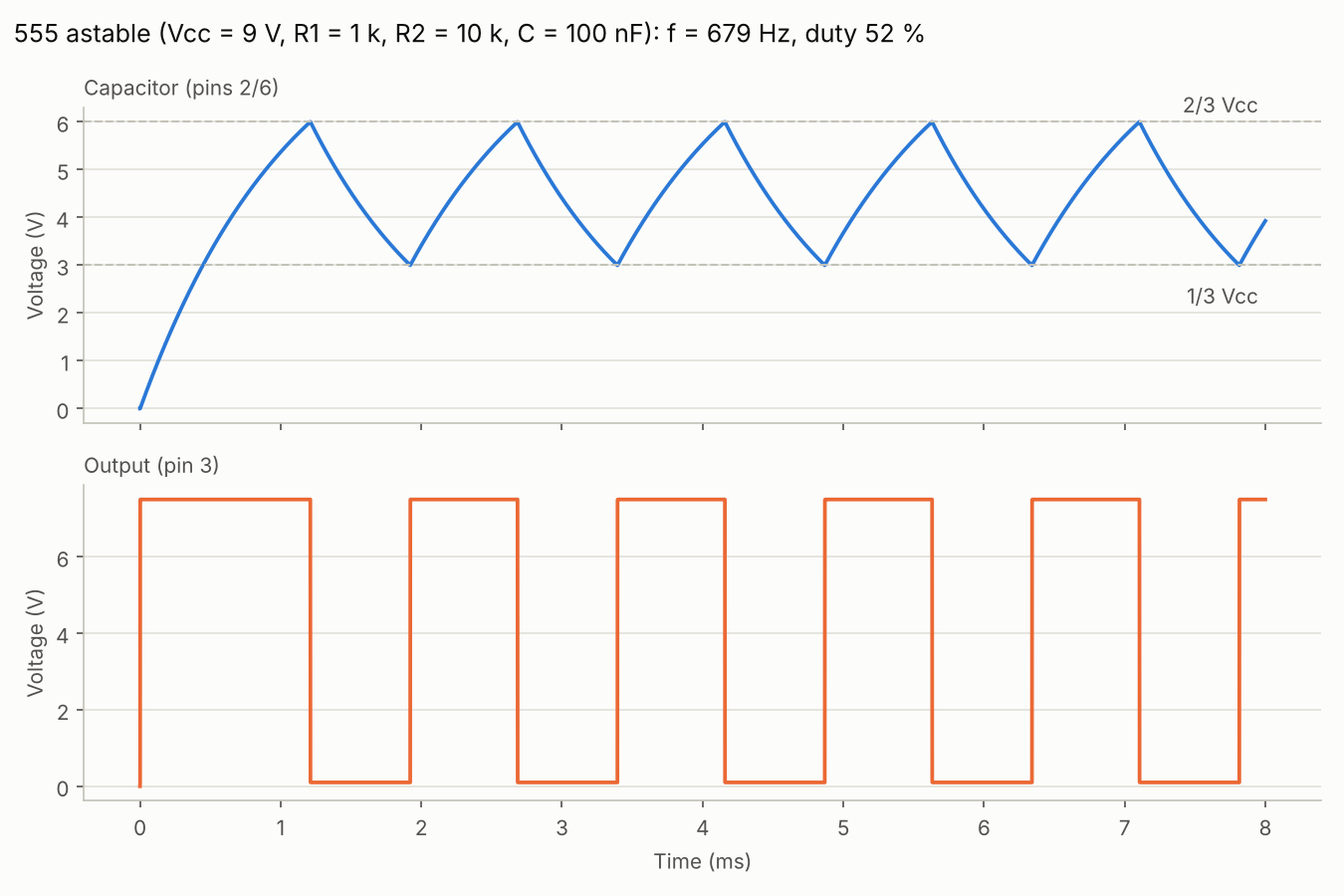
Astable multivibrator.
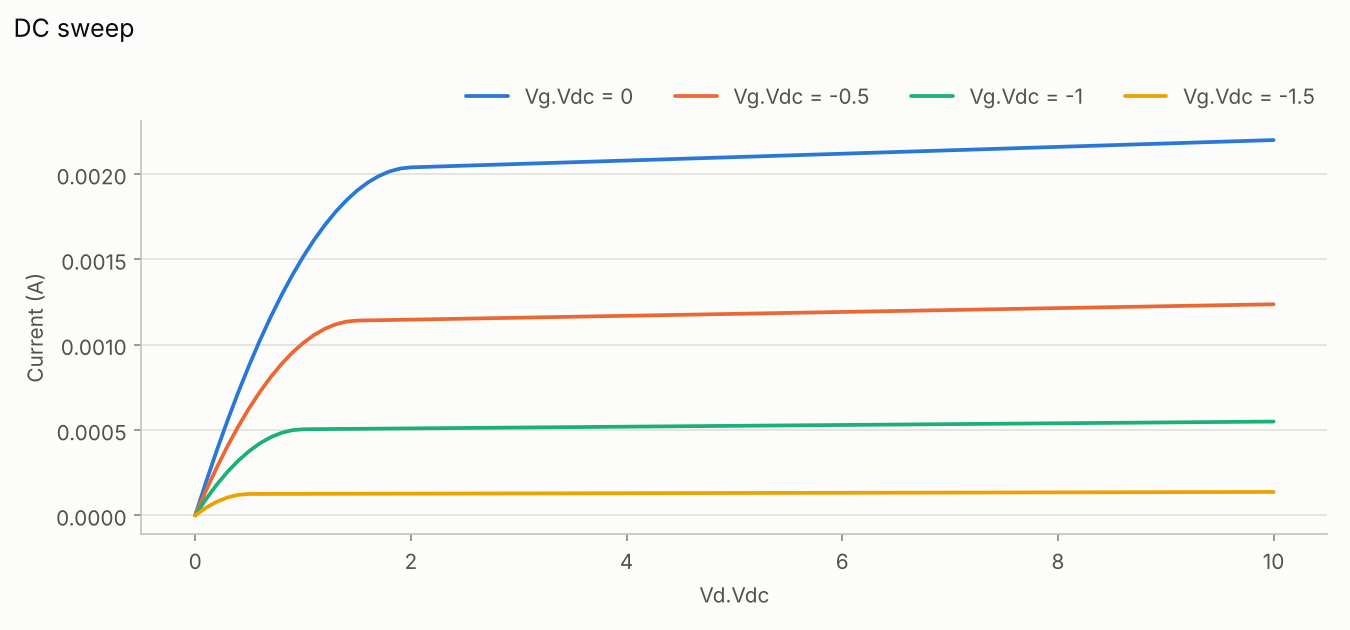
Output characteristics with a DC sweep.
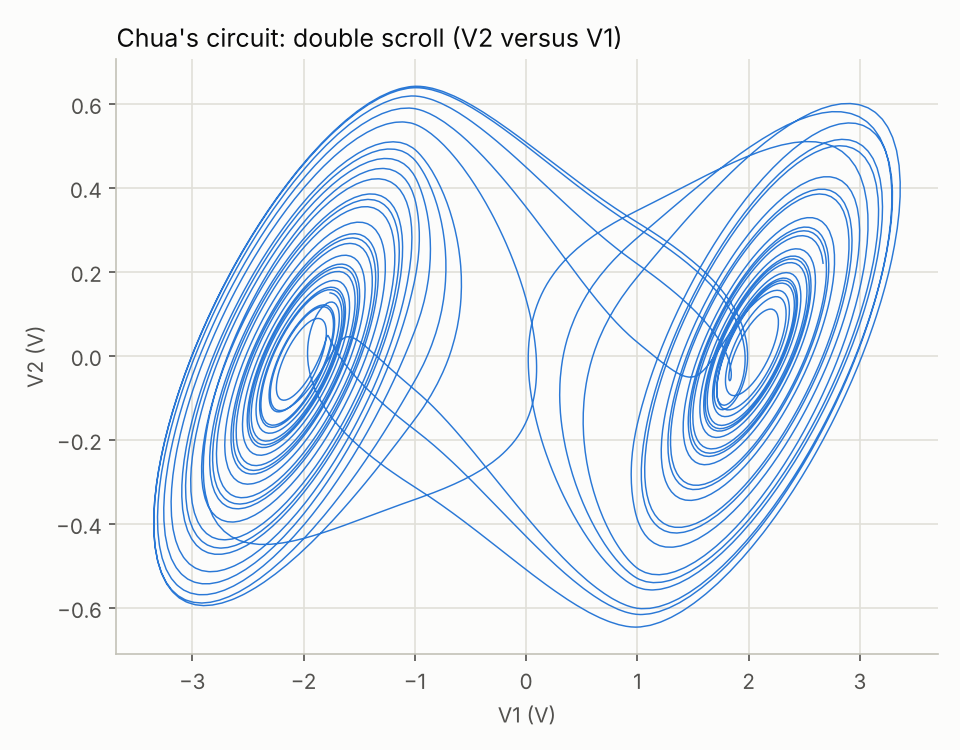
Double-scroll chaotic oscillator with op-amps.
Choose one of the three options:
The complete CAD application.
The CAD tools inside Visual Studio Code.
For your own Python scripts.
$ pip install pyams-lib
NumPy and Matplotlib are installed automatically. To upgrade later:
$ pip install --upgrade pyams-lib
pyams-lib on PyPI
Options 1 and 2 already include the pyams library: do not install it with pip.
| 1. PyAMS software | 2. VS Code + extension | 3. pip install pyams-lib | |
|---|---|---|---|
| Python | required | required | 3.8 or higher (CPython or PyPy) |
| NumPy and Matplotlib | required | required | installed automatically |
| Visual Studio Code | – | required | – |
The pyams library |
included | included | installed by pip |
| System | Linux, Windows or macOS | ||
Download the PyAMS software, or get the extension, the library, the documentation and the source code.